Site Language
Sandvox allows you to set the principal language a site is in. Although Sandvox does not allow you to specify multiple languages, you can create a multilingual site using several Sandvox documents, as detailed in "Creating a Multilingual Site."
To set the site language:
- Open the Document Inspector to the Site tab.
-
Select the site language from the drop down menu.
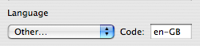
If your desired language is not in the list, you can choose "Other…" and enter the ISO standard language code in the box instead.
When you create a new site, Sandvox automatically sets the language from the first item in the Language Settings in the "International" pane of the System Preferences. If you are planning in writing your website in a language other than your preferred language, you should set the language manually from the inspector.
The site language is made use of in:
HTML Headers
The site language is included in the header of each page of a site once it is published. Although visitors cannot see this information, search engines like Google can. They can use it to limit users' searches to their chosen language, or even automatically translate the site if needed.
For more information on the use of language tags in HTML, you may be interested in this article by the W3C.
Page Elements
Sandvox makes use of the site language at various points of the editing process. For example:
- When you first create a site, Sandvox attempts to localize certain text such as the title of the Home Page, or the Site Tagline.
- The hidden elements of pages used for accessibility (e.g. "skip navigation" links) are localized.
- The default title of each field in a Contact Form is localized.
Keywords: site, page, text, language, languages, local, localize, localized, localise, localised, writing, word, words
