Home Page
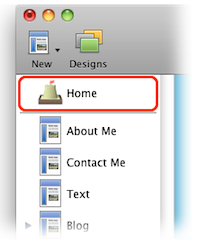
The Home Page is possibly the most important page of your site. It is the first page visitors will see, and so should be designed to welcome visitors and point them to other parts of the site.
On any page of your site, visitors can click the site logo or title to go to the Home Page.
The Home Page is a collection that contains all the other pages of your site. Because of this, you can use all the usual features of a collection (such as sorting and an Index) on the Home Page.
Note that unlike other pages of your site, you cannot change the Home Page's file name. Please see the "Page Details" article for more information.
A site's Home Page appears at the top of the Site Navigator. It is separated from the other pages by a thin gray line. The icon next to the Home Page is that which you set as the site's Favicon.
Keywords: home, page, homepage, favicon, site, menu, first
