Logo
Sandvox allows you to add a logo to your site; a small image displayed at the top of every page. Generally you use your company or organization's logo.

Earth Savers logo as it appears in the logo area
To set a site's logo:
- Open the Document Inspector.
- Go to the Appearance tab.
- Check the "Logo" box.
- A placeholder for the logo will now have appeared in the Web View. Drag an image onto it, or select it and choose a file from the Object Inspector.
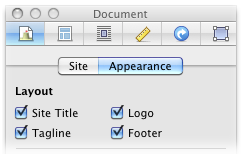
To remove the Logo, uncheck the logo box in the inspector.
Site Title
If the logo image you are using includes your site's title, you can use the Document Inspector to hide the site title to stop it appearing twice unnecessarily.
Keywords: banner, logo, logos, icon, site, image, insert, inserting, custom, company, organization, organisation, company's, organsiation's, organization's
