Inspector
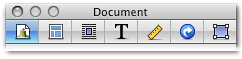
Sandvox has an Inspector, where you configure many site settings. There are seven inspector areas:
- Document
- Page
- Wrap
- Text
- Metrics
- Link
- Object
Ways to show or hide the Inspector:
- Document inspector (Shortcut: Command-1)
- Contains settings that affect the entire site
- Page inspector (Shortcut: Command-2)
- Contains setting that affect the page you have selected in the site navigator
- Wrap inspector (Shortcut: Command-3)
- Has Object Placement for placing objects as Inline, Callout, or in the Sidebar. There are options for the Layout, you can also specify a Border for your objects (if allowed by the design)
- Text inspector (Shortcut: Command-4)
- Used to add Bullets & Numbering
- Metrics inspector (Shortcut: Command-5)
- Used to adjust Width and Height of an image to the pixel
- Link inspector (Shortcut: Command-6)
- Use the Link To to create links to internal pages, full size images, or external URL's
- Object inspector (Shortcut: Command-7)
- Use this segment to setup the setting specific to the object you have selected
Keywords: inspect, inspector, palette, float, floating, window, panel, setting, settings, attribute, attributes, i, property, properties
