Collection
A collection is a special type of page that contains other pages, much like a folder on your computer contains various files. You can nest as many collections within each other as you like.
Unlike a computer folder, however, a collection also contains content itself. Usually the main content is an index listing the items in that collection. (This page, when uploaded to your host, is usually called "index.html" but that file name is generally hidden from the person viewing your website.)
Every site has at least one collection, since the Home Page is actually a collection that contains all the other pages of the site.
Consider the example of a simple site below. The site structure is shown both in the Site Navigator and in a diagram form.
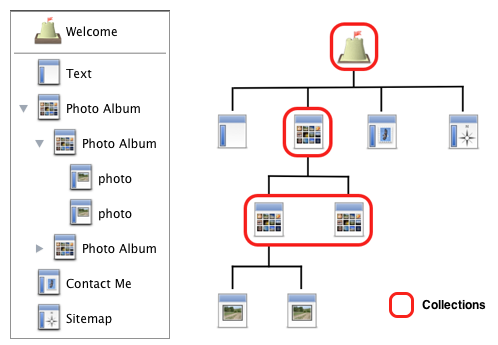
As you can see, there are a total of four collections; they are arranged in a hierarchy.
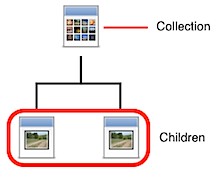
Each collection can have any number of children:
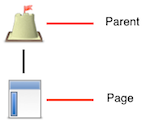
And each page has a parent:
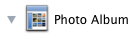
Collections are displayed in the Site Navigator with a disclosure triangle next to their icon. Click the triangle to show and hide the children of the collection.
To create a new collection from one of the templates:
- Click the "New" item in the toolbar, or select "New Page" from the Insert menu
- Select "Blog" or "Photo Album"
Or from scratch:
- Insert a new "Empty/Text" page
- Open the Page Inspector
- Go to the "Collection" tab
- Click the "Convert to Collection..." button
To group existing pages into a new collection:
- Select one or more pages in the Site Navigator.
- Click the "Group" item in the toolbar or choose "Group as Collection" from the Insert menu.
Collection Settings
To edit a collection's settings:
- Click the collection in the Site Navigator to select it.
- Open the Page Inspector then click the 'Collection' tab.
Automatic Sorting
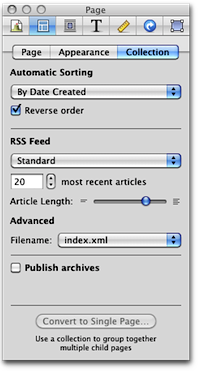
Select the order in which the pages of the collection are sorted:
- None
- You can arrange the order of the pages yourself in the Site Navigator.
- Alphabetical or reverse alphabetical
- Pages are sorted in alphabetical order by their Page Title, either from A-Z or from Z-A.
- Date Created
- Sorts the pages by their date and time. You can sort with the most recent page at the top or bottom.
- Date Modified
- Sorts the pages by their date and time. You can sort with the most recent page at the top or bottom.
RSS Feed
Generates an RSS feed for the contents of the collection. Visitors can then subscribe to the RSS feed to be notified when you update the collection. The are several different options:
- None
- Standard
- Photocast
- Podcast
The RSS feed is set so that Sandvox can generate appropriate RSS markup for dealing with attached media.
Most Recent Articles
The maximum number of pages to display in the RSS Feed.
Article Length
Slide the slider to the left or right to lengthen or shorten the length of the article that shows on the RSS Feed.
The truncation taking place here is independent of the truncation chosen in a blog's index inspector [see below], so that while your website might truncate articles very lightly or not at all, your feed might truncate the articles heavily, to encourage your RSS feed readers to come to your website.
Advanced — RSS Filename
Choose the file name of your RSS feed between index.xml or index.rss
Index.xml is most common but not accepted by all servers.
Troubleshooting
Some servers, if there is an index.xml present, will try to send the contents of that file — meant for RSS readers — when somebody's browser requests a page. The page that the server serves up should be index.html. If your server has this problem, then you will want to set this value to index.rss for all your collections with an RSS feed.
Publish Archives
If you are going to be using a Collection Archive you will need to check this box.
Convert to Single Page
If you have a collection without any pages in it, you can convert that collection to a single page.
You can do that in the inspector on the page selector, collection tab, 'Convert to Single Page...' at the bottom.
You can make a single page a collection in the inspector as well.
Keywords: collection, collections, group, groups, page, pages, folder, folders, parent, parents, child, children, weblog, blog, weblogs, blogs, photo, photos, album, albums, gallery, galleries, download, downloads, list, alphabet, alphabetical, alphabetize, alphabatize, numerical, chronological, date, time, letter, letters, sort, sorting
