Summary
A summary is a piece of text describing a page. The summary can then be displayed in a collection's index.
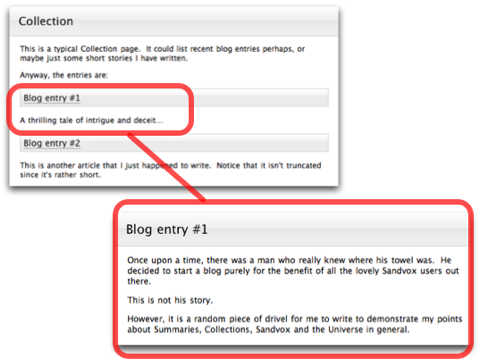
For example, a typical collection page contains summaries like this:

Note how the summaries link up to their respective pages in the collection:

As you make changes to the page the summary automatically updates itself.
Article Length

Often a page contains a large amount of text. If all of this text is included in a summary, and there are several summaries like this, it can make a collection page very long and difficult to read.
To solve this, Sandvox allows you to limit the length of summaries.
To limit the length of the summaries of a collection:
- Select the index
- Open the Object Inspector
- Use the slider next to "Article Length" to shorten or lengthen
At the end of a truncated summary, a link will automatically appear so that visitors can follow it to continue reading the article.
Custom Summaries
You can also give a page a custom summary. With a custom summary, the summary text is not automatically taken from the page it links to. Instead, you edit the text yourself, completely independent of the page's content.
This is useful if you find that a simple truncated text summary is not sufficient for a particular page. For example you could do something like this:
To turn a summary into a custom summary:
- Control-click the summary in the Web View.
- From the contextual menu select "Add Custom Summary"
- Click on the page so that it is focused on (the background gets darker), and you will then see a blue box to add your custom summary to.
To remove a custom summary:
- Control-click the custom summary in the Web View.
- From the contextual menu select "Remove Custom Summary"
Keywords: summary, summaries, custom, truncate, text, truncation, limit, character, characters, text, limit, short, shorten, restrict, description, page, control, click, right, control-click, right-click, index, indexes
