Publishing Your Site
At some point you will want to publish your site. Publishing is simply the process of taking your site from Sandvox and placing it somewhere that is accessible to visitors. Before a site can be published, you must first set up the host Sandvox will be publishing it to.
Note: Sandvox makes use of an open-source FTP/SFTP/WebDAV library that works well with most hosts. However, not all hosts are alike, so it is possible that you may have trouble publishing. (This is why we allow publication of a page when Sandvox is in trial mode (Not Applicable in Mac App Store edition) so you can verify for yourself that Sandvox can upload to your host.) If you do have trouble, please visit our support forum to let us know about the problem, and then use an FTP program to upload your site.
Publishing Changes
Generally when publishing, you only want to upload those files that have changed since the site was last published. Publishing the other files will only waste time. This is the default way in which Sandvox publishes a site.
When you publish changes, Sandvox may actually publish more pages than you thought would be published. In most cases this is normal. Some changes to a single page affect many other pages. For example, if you change a page to be included or excluded from the Site Menu, every other page on the site will have to be updated to show that change in the site menu! Or if you change a page that appears in an index somewhere on your site, those pages containing that index will need to be published.
Ways to publish the changes to a site:
- Click the "Publish" item in the toolbar.
- Choose "Publish Changes" from the Publish menu.
If there are no changes that need publishing, Sandvox will inform you and nothing will be uploaded.
Publishing Everything
Occasionally you may wish to publish every page of a site, regardless of whether Sandvox thinks they need uploading or not.
To publish all pages:
- Open the Publish menu.
- Choose "Republish All".
Publishing to your computer
Sandvox can also publish a site to a folder on your hard drive (or attached network volume).
During Progress
While publishing, Sandvox displays the progress made:
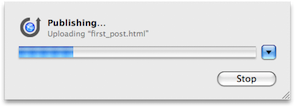
At any stage you can click the "Stop" button to end publishing. Note that this can leave you with an only half-functional site online.
Click the "Show Files" triangle to see more detailed information about which files Sandvox is uploading and how far they have progressed. (Hover your mouse over the icon next to each file or folder in the list to see details about the upload.)
Once publishing is complete, Sandvox will inform you and offer to let you view the site online.
When connecting to your server, Sandvox might encounter an invalid certificate and need to prompt you about it.
After Publishing
Once you have published your site for the first time, you will probably want to add it to the various search engines (e.g. Google). Please see "Sandvox sites and search engines" for more information.
Keywords: publish, publishing, published, site, sites, export, exporting, upload, uploading, make, making, save, saving, change, changes, changed, entire, all, online, view, progress, pie, chart, symbol, icon, blue, dot, dots, marker, markers, dimple, dimples, mag.png, sandvox_castle_white.gif, sandvox.css
