Arranging the pages of a site
The Site Navigator is used to arrange the pages of a site. The position of the pages defines their order in both the Site Menu and any indexes.
To move a page around, simply drag its icon in the Site Navigator. While you are dragging, a blue line appears to indicate where the page will be placed once released:
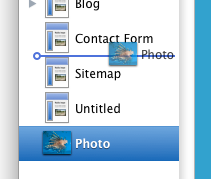
If you hover over a Collection for a moment when dragging, it will expand to show its contents. This allows you to easily move a page into a Collection, or from one Collection to another.
To convert a page into a collection:
- Select the page in the site navigator
- Open the Page Inspector
- Select the "Collection Tab"
- Click the "Convert to Collection" button
or, if the page hasn't been published yet:
- Drag and drop another page onto it. Sandvox will convert it to a collection, and place the dropped page inside
Troubleshooting
You may find that you can't drop a page where you want to in the Site Navigator. This is because the Collection you are trying to place it in is being automatically sorted. (Don't forget that the Home Page is a Collection too!)
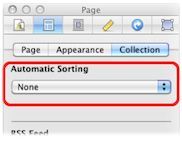
To stop the Collection from being automatically sorted:
- Select the Collection in the Site Navigator.
- Open the Page Inspector.
- Go to the collection tab.
- Set the "Automatic Sorting" popup to "None."
You can now place pages in any order you like within the Collection.
Keywords: site, outline, navigator, arrange, order, ordering, place, sort, rearrange, reorder, resort, rearranging, reordering, resorting, re-arrange, re-order, re-sort, page, pages
