Setting the font size of a site's title
Sometimes a site you are working on has a long or short title that doesn't quite fit into the available space as well as you'd like. How you set the size of the font used for the title depends on if the site's design uses graphical titles.
To set the font size of a non-graphical site title:
- Select the Home Page in the Site Navigator.
- Click the site title to begin editing it.
- Select all of the title text.
- Choose "Show Fonts" from the Format menu to open the font panel.
- Set the font size and close the panel.
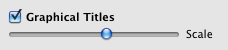
To set the font size of graphical title:
- Open the Document Inspector.
- Go to the Appearance tab.
-
Adjust the slider:
Keywords: site, title, titles, text, graphical, font, fonts, size, sizing, head, heading, clip, clipped, cut off, too big, too small
